
The online language learning platform is very well thought and organized and puts both learners and teachers in the best position to start interactive language lessons.


Yo!Coach vs Pinlearn: Prices Can Be Misleading
How Yo!Coach is different from Pinlearn and why is the latter so moderately priced? A common query of our prospects these days and one we often feel needs a more elaborate answer.
To begin with, this is a question that's bound to strike any business owner that's considering different software to launch some form of business. Usually, there's a tendency to believe that if the feature sets of two software are more or less similar, you can opt for the more economical of the two. But what if the pricing gap is quite substantial? That creates the confusion. Does a higher price usually translate into higher quality and vice versa?
In the following comparison, we'll attempt to address all such questions. Moreover, we'll help the prospect understand how a software's price tag can be misleading and may not disclose the whole story behind its functionality, usage, security, and support. So let's dive into it straightaway.
- Features &
Functionality - Brief
Comparison - Qualitative
Assessment - Product
Feedback - Client
Portfolio - Customization
Capability - Product
Growth - Product
Documentation - Special
Benefits - Final
Verdict

A product of FATbit Technologies, launched in 2004
- Delivered 1000+ successful projects
- Serving a global clientele in over 40+ countries
- Catered 15+ niches through customizations
- 19+ Years of experience

Ed-tech company, launched in 2016
- Only 1 successful project showcased
- No proof of global coverage
- No proof of architectural customization
- 2+ Years of experience
Gain In-depth Insights into the Capabilities of Yo!Coach With Our Experts
Schedule a CallFeatured in

FATbit Technologies has released a new version of its popular product, Yo!Coach
- A turnkey solution to build online tutoring and consultation marketplace platforms.
Head to Head Comparison: Yo!Coach vs Pinlearn
The features and functionality of tutoring software translate into the capabilities that set it apart from the competition. Below is a head to head comparison of both software along the lines of their features and functionalities. Key points of comparison include Admin, learners and tutors' features and settings, lesson management, payment gateways, add ons, marketing features, analytics tools, and software security.
Admin Features
| Feature | 
|

|
|---|---|---|
| Mobile Apps | Yes | Yes |
Dashboard |
||
| Interactive Dashboard | Yes | No |
| Graphical Representation of Data | Yes | No |
| Language label Manageability | Easy to manage all labels on the platform | Can add and delete the labels. Edit option is not available. |
User Manageability |
||
| Hassle Free User Management from admin end | Yes | Very Confusing, As they don't have detailed description |
| Impersonate User Profile | Yes | No |
Multiple User Management |
||
| Multiple Admin User Management | Yes | No |
| Permission Management | Yes | No |
Content Management System |
||
| Blog Management | Yes | No-(very basic only) |
| Website Theme Management | Yes | |
| Homepage Sections Management | Yes | |
| FAQ Management | Yes | |
| Website Navigation Management | Yes | |
| Abusive Words Handling | Yes | |
Progressive Web App |
||
| PWA Management | Yes | No |
| UI Layouts | Yes | No |
| PWA Theme Management | Yes | No |
Tutor Management |
||
| Tutor Edit/Delete | Yes | Yes |
| Language Spoken by Tutor | Yes | Yes |
| Tutor Filters | Registration Duration - Registration Date and Time , Featured Tutors | Subjects, Ratings |
| Tutor Approval Status | Can check status via toggle button and overall verified status. Separate verification menu. | Check if tutors are active or their email is verified. Approval UI is straightforward and easy to use. |
| Tutor Profile Modification | Admin can edit the tutor's profile after logging into the tutor's profile. | Admin can edit a profile to change profile picture, name, phone number, languages, etc. |
| Tutor Timezone | For all modification options, the admin can log in to tutor to modify the timezone. Daylight Savings feature present | Admin can change timezone directly. Daylight Savings feature present |
| Tutor Rating | The admin can approve/dis-approve tutor ratings | Can be managed by Admin |
Appointment Management |
||
| View Orders Listing | Yes | Yes |
| Date-wise filtering | Yes | No |
| Search Filters | User Name, Payment Status, Order Type, Session Status | User, Session Type, Status |
Multi-Language Management |
||
| Upload language Labels file in .CSV | Yes | No |
| Manual translation required | Yes | Yes |
| Auto translation (MSN) | Yes | No |
| Right-to-left (RTL) support for Arabic | Yes | No |
Students Management |
||
| Add/edit/delete students | Edit and Disable | Yes |
| Browse and manage the list of users. | Yes | Yes |
| Filter students by username/email. | Yes | Yes |
| Filter students who are active/inactive. | Yes | Yes |
| Filter students who have not completed email verification. | Yes | Yes |
| Filter students by date | Registration | Creation |
Order Management |
||
| Detailed order detail | Yes | No |
| Separate order listing for Different session types | Yes | No |
Tutor Payouts Management |
||
| See a list of pay-out requests from tutors | Yes | Yes |
| Filter pay-out requests by date, tutor name | Yes | Yes |
| Manage pay-out status approved/rejected | Yes | Yes |
Course Management |
||
| Pre-Recorded video courses functionality | Yes | Yes |
| Course Creation | Yes | Yes |
| Course Module On/Off functionality i This functionality enables the admin to easily On/Off the course module's visibility. Switch between live sessions and pre-recorded courses seamlessly. The interface of the platform adapts automatically as per the chosen option. | Yes | No |
| Certification | Yes | Yes |
| Video Courses Notes | Yes | No |
| Courses Reviews | Yes | No |
| Pre-Recorded Course Progress Tracker | Yes | Yes |
| Vdocipher (Video hosting tool) | Yes | No |
| MUX Integration | Yes | No |
| Course Refunds | Yes | No refund policies are defined |
In-person Sessions |
||
| Enable/Disable offline sessions | Yes | No |
| Geolocation | Yes | No |
Quiz Module |
||
| Manage quiz categories | Yes | No |
| View questions and quiz listing | Yes | No |
Teacher Preferences Management |
||
| Add/Edit/Delete teacher preferences | Yes | No |
| Multi-Level Subject Category | Yes | No |
Price Settings |
||
| Admin can manage the price | Yes | No |
| Teacher can manage the price | Yes | Yes |
Currency Management |
||
| Currency Globalization | Yes | No |
| Currency Conversion API | Yes | No |
| Price Manageability Setting | Yes | No |
Forum Management |
||
| Manage Questions | Yes | No |
| Reported Questions | Yes | No |
| Forum Tags | Yes | No |
| Requested Tags | Yes | No |
| Report Reasons | Yes | No |
General Site Settings |
||
| Set up a website name | Yes | Yes |
| Add the website logo | Yes | Yes |
| Add website favicon | Yes | Yes |
| Add website contact email address. | Yes | Yes |
| Set up commission % on each transaction | Yes | Yes |
| Issue escalation management | Yes | Yes |
| How it works page, has a youtube video | Yes | Yes |
| Third Party API Management | Yes | Yes |
Admin can be change text for the following areas such
as:
|
Yes | Yes |
Disclaimer:
? The webpage has been created with consideration and care. We strive to ensure that all information is as complete, correct, comprehensible, accurate and up-to-date as possible. Despite our continuing efforts, we cannot guarantee that the information made available is complete, correct, accurate or up-to-date. We advise - the readers should not take decisions completely based on the information and views shared by Yo!Coach on its webpage, readers should do their own research to further assure themselves before taking any commercial decision. The 3rd party trademarks, logos and screenshots of the websites and mobile applications are property of their respective owners, we are not directly associated with most of them.Student Features
| Feature |
|
|
|---|---|---|
Session Notes |
||
| Notes | Yes | No |
Dashboard |
||
| Analytics | Yes | No |
| Find a tutor as per applicable students details. | Yes | No |
| Gift Card | Yes | No |
| Session Log | Yes | No |
| Messages History | Yes | No |
| Detect Tutors Session Start Time | Yes | Yes |
| View upcoming sessions | Yes | No |
| Booking stats | Yes | No |
Profile Management |
||
| Switching between Tutor profile and learner profile | Very easy with just a click a user can switch between Tutor and Learner profile | Only single profile |
| Sync with Google Calendar | Yes | No |
| Cookie Consent Settings | Yes | No |
| Account Deletion Option | Yes | No |
| Add/Update/Remove profile information such as Email, phone number, address, etc. | Yes | Yes |
| Add/Update/Delete a profile description. | Yes | Yes |
| Now there is an option to edit the password for the users (Tutor and student) from the frontend. | Yes | Yes |
| The profile of the tutor can be shared through Facebook and Twitter by the user. | Yes | Yes |
Transaction Management |
||
| Digital wallet for students | Yes | No |
| Browse a list of all the transactions done on the website with status details. | Yes | Yes |
| Browse details of all the transactions done on the website. | Yes | Yes |
Lesson Management |
||
| Tutor's profile share options | Facebook, Twitter, Pinterest, and Email | Only Facebook and Twitter |
| Browse a list of all the lessons purchased on the website with status. | Yes | Yes |
| Browse details of all the purchased lessons on the website | Yes | Yes |
| Sort the list of transactions by the tutor, price, date, enrolment type, status, etc. | Yes. Filters - Status, class type. | Yes |
| The student can reschedule his sessions before the allowed duration. | Yes | Yes |
| Students can't book a group class when it overlaps with their existing class. | Yes | Yes |
| Students can rate and review the tutor once the one-one class and group class are completed. | Yes | Yes |
| Buy 1 on 1 Classes as Bundles | Yes | Yes |
Misc Features |
||
| Refer and Earn | Yes | Yes |
| Group Chats | Yes | No |
| Gift Card | Yes, credits provided in the form of coupon | The students can gift any specific course/class |
| Post a query | Yes | No |
| Review lesson Plan | Yes | No |
| Withdraw Wallet Amount | Yes | No |
Tutor Features
| Feature |
|
|
|---|---|---|
Dashboard |
||
| Single sign-up interface for tutors and students. | Yes | No |
| Dedicated dashboard for registered Tutors. | Yes | Yes |
| Gift Card | Yes | Yes |
| On-site chat between tutors and students. | Yes | Yes |
| Detailed dashboard with all the critical analytics displayed in a graphical interface. | Yes | No |
| Easy to use navigation for hassle-free movement across different interfaces in the dashboard. | Yes | Yes |
| Tutors need to upload verification, certification document, and resume during registration. | Yes | Yes |
Profile Management |
||
| Add/Update/Remove profile information such as Email, phone number, address, etc. | Yes | Yes |
| Add/Update/Delete a profile description. | Yes | Yes |
| Update resume (work, education, experience, certifications in their profile, etc.). | Yes | Yes |
| Account delete option | Yes | No |
| Sync with Google Calendar | Yes | No |
| The quiz can be linked with a one-to-one lesson | Yes | No |
| The quiz can be linked with a group class | Yes | No |
| The quiz can be linked with a course | Yes | No |
| Choose from a list of the subject categories and sub-categories to teach. | Yes | No |
| Add introduction videos in the tutor profile. | Yes | Yes |
| Tutors can share the profile on social media | Yes | Yes |
| Manage Lesson Plan | Yes | No |
| Manage Quiz | Yes | No |
| Manage Courses | Yes | Yes |
Transaction Management |
||
| View details of each transaction. | Yes | Yes |
| Digital wallet for tutors | Yes | Yes |
Appointment Management |
||
| A dedicated list of all the appointments booked by the students with the respective tutor. | Yes | Yes |
| Sort appointments-list based on multiple aspects such as Subject, Date, status, etc. | Search-based sorting. | Yes |
| The tutors can upload lesson material to the students from the appointments page. | Yes | Yes |
| Tutors can attach lesson materials for the students for his 1-1 and group class against each appointment from their appointments page. | Yes | Yes |
| Google Calendar Sync Management | Yes | No |
| Detect Tutors Start Time | Yes | Yes |
Payout Management |
||
| Tutor earnings and balance pay-out details. | Yes | Yes |
| Track the pending pay-outs and approved pay-outs for any two time periods. | Yes | Yes |
| Add bank-account details to receive pay-outs from the Admin. | Yes | Yes |
| A detailed list of all the pay-out transactions done with multiple filter options. | Yes | Yes |
| Tutors can also request their payouts from a PayPal account or a PayPal email id. | Yes | Yes |
Refund Request Management |
||
| A dedicated list of all the active, pending and approved refund requests. | Yes | Yes |
| Approve/Decline a refund request after citing the reasons | Yes | Yes |
Misc Features |
||
| Refer and Earn | Yes | Yes |
| Group Chats | Yes | No |
| Gift Card | Yes | The students can gift any specific course/class |
| Post a query | Yes | No |
| Withdraw Wallet Amount | Yes | No |
Add-Ons
| Add-Ons |
|
|
|---|---|---|
| Quiz Module | Yes, by default | Additional Charges |
| Attachment in Chat | Yes, by default | Additional Charges |
| Refer and Earn | Yes, by default | Additional Charges |
| Offline Classes | Yes, by default | Additional Charges |
| Partial Refund | Yes, by default | Additional Charges |
| Platform Notifications | Yes, by default | Additional Charges |
| Student Wallet | Yes, by default | Additional Charges |
| Subscriptions for 1-on-1 lessons | Yes, by default | Additional Charges |
| Social Login | Yes, by default | 99 USD |
| Currency Conversion API | Yes, but manual | 199 USD |
| PayPal Payout | Yes, by default | 249 USD |
| Multiple Sub-Admins | Yes, by default | 199 USD |
| Email Management | Yes, by default | 149 USD |
| Add Appointments to Google | Yes, by default | 149 USD |
| Arabic Right To Left Multi-Language | Yes, by default | 249 USD |
| PayPal | Yes, by default | 199 USD |
Online Meeting Tools
| Tools |
|
|
|---|---|---|
| Jitsi | Yes | No |
| Atom Chat | Yes | No |
| LessonSpace | Yes | Yes |
| Zoom | Yes | Yes |
| Pencil Spaces | Yes | No |
Analytical & Marketing Tools
| Tools |
|
|
|---|---|---|
| Google Analytics | Yes | Yes |
| Any live chat software | Yes | No |
| Graphical Stats | Yes | No |
| Information from Google Analytics | Yes | No |
| SEO settings like keywords and description. | Yes | Yes |
| Option to enter meta tags, Google Analytics code. | Yes | Yes |
| URL Rewriting | Yes | No |
| Robots.txt file | Yes | No |
| Sitemap | Yes | No |
| Social Media Profile Sharing | Yes | Yes |
Security
| Feature |
|
|
|---|---|---|
| User Account Deletion | Yes, through erasure request | No |
| Cookies Management | Yes | No |
Payment Gateways
| Gateways |
|
|
|---|---|---|
| PayPal Standard | Yes | No |
| Authorize.net | Yes | No |
| PayGate | Yes | No |
| PayStack | Yes | No |
| M-Pesa | Yes | No |
| PayFast | Yes | No |
| Stripe | Yes | Yes |
| Manual Bank Transfer | Yes | Yes |
| Multiple Payment Gateway Addons available on request | Yes | Yes |
In Simple Words
As is quite evident from the comprehensive comparison, Yo!Coach edges Pinlearn in many aspects of tutor/learner management as well some crucial 3rd party integrations. In fact, Pinlearn's lower pricing might be explained by its lack of add-ons. If we account for the cumulative cost of integrating some of these add-ons, Pinlearn's final price would easily surpass Yo!Coach. But price alone can't be the determining factor to crown Yo!Coach as the best Pinlearn alternative. That's why we'll now compare the two software along such diverse facets as user experience, client-base & portfolio, customizability, post delivery support, documentations and much more. Here we would also like to mention that Yo!Coach offers a refund policy which Pinlearn doesn't offer.
Are you looking for Pinlearn Alternative?
Consult ExpertsYo!Coach vs Pinlearn - Qualitative Assessment
Whose User-Experience Lives Up to the Expectations?
The user experience of Yo!Coach built platforms feels like a modern system. The navigation is quite easy and fairly intuitive for the most part. In a couple of easy steps, learners can start their online learning journey. This seamless approach is contrary to Pinlearn. Pinearn has some complicated steps that are a bit difficult to learn at the beginning.
Each of these steps adds friction which can cause learners to drop out of the process. The admin panel of Pinlearn built platforms is also not as interactive as in platforms built using Yo!Coach. The graphical representation of total earnings, commissions, visitors, and website traffic in Yo!Coach becomes easy to analyze. Moreover, it enables effortless interpretation of numerical data, functions, and other qualitative structures for the admin.
Pinlearn's admin dashboard data is presented in a plain form (without charts and graphs) which is not at all appealing and interactive.


Admin Panel Distinction - Yo!Coach vs Pinlearn
Whose Portfolio Captures The Attention?
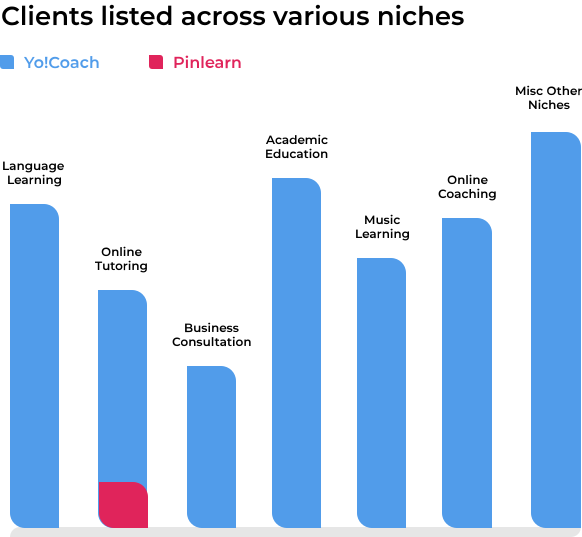
Yo!Coach has a rich and elaborate portfolio that showcases some 200 plus projects. It has catered to a wide range of niches across different geographies.
As for Pinlearn, we didn't find any substantial proof of its work. While the software company claims that it can cater multiple niches, there's hardly any project brief to be found on its official website or other independent websites that showcase popular software achievements.
Yo!Coach's most prominent platform is WTutors, which has more than 500 listed tutorings and thousands of students making use of its services. In stark comparison, Pinlearn's topmost platform creation - SuperKid has merely 7 tutors tutoring on the platform.
Which is More Customizable?
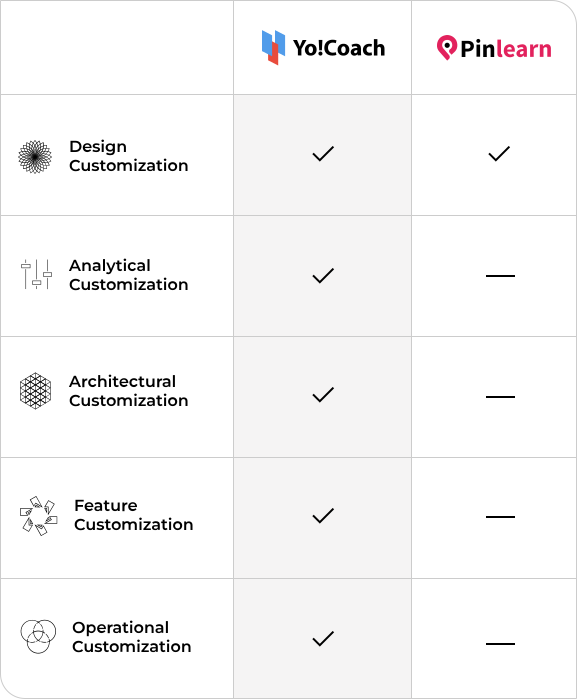
Yo!Coach and Pinlearn both claim to be fully customizable software & capable of catering to several niches in addition to online tutoring. However, no proof of work can be seen in the case of Pinlearn. On the other hand, Yo!Coach's customizable architecture has been deployed to build everything from language learning platforms, consultation platforms, music learning platforms, academic education platforms, to accent coaching platforms, and fitness & wellness coaching platforms, and many more with live examples of platforms highlighted in ample detail in its case studies.
The customizability of Yo!Coach enables it to meet new and dynamic requirements of businesses to stamp their unique identity in the market. Pinlearn, however, leaves much to be desired in terms of its capabilities and multi-niche support.
Get Customization as per your requirements
Talk to ExpertsWho Provides Better Documentation?
Yo!Coach team has developed a vast knowledge base of the software which includes feature lists, user manuals, and setup guides to integrate 3rd party APIs, all of which are publicly available. Likewise, Pinlearn also provides documentation but it is not as detailed.


Who Offers More Benefits & Better Support?
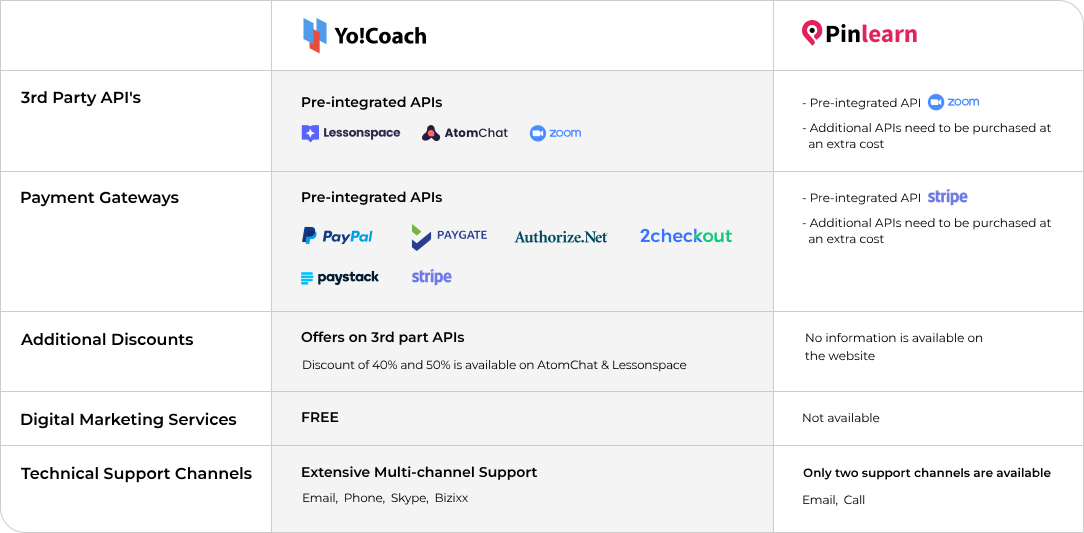
Yo!Coach comes with a number of additional benefits owing to its partnership with 3rd party service providers. A discount of 40% and 50% is available on AtomChat and LessonSpace when you buy subscriptions for these services using Yo!Coach's coupon codes. Moreover, Yo!Coach also comes with free digital marketing services which include Google Analytics, Search Console, and Business Profile setup. These services help businesses gain recognition and appeal even before their big launch in the market. While Pinlearn and Yo!Coach both offer 1 year free technical support, the latter offers multi-channel support in the form of email, phone, skype and Bizixx(in-house project management tool). Pinlearn's support is only available via call or email.
Choose Yo!Coach for enthralling benefits and better technical support
Get Started NowPedigree In the Technosphere
Whenever one's considering a software for use, it's common to do some background check and find out how that service came to be. That usually involves taking a look at how long the software has been around and checking newsworthy content to gain information about its core values, achievements and vision for the future. So, in the case of Yo!Coach, we know it's a product of FATbit Technologies, a software design and development company founded in 2004 with a view to catalyze the eCommerce industry. Besides Yo!Coach, the company has 20+ white label software to cater diverse niches like eCommerce, online rental, grocery, food delivery, service marketplaces, cab booking and more.
FATbit's extensive portfolio that includes incredible businesses from every corner of the globe, is proof enough of its solid business acumen.
In Pinlearn, we find the software has a relatively obscure beginning and there's no track record of its journey through the years . We couldn't find any details about the tech team behind Pinlearn. Moreover, the software has an actual dearth of case studies that help users get an understanding about the company's methodology and know-how in solving complex business problems.
Are you using Pinlearn and are looking to migrate to Yo!Coach?
Contact Us NowCrowning The Winner
Be it technology, design, experience, or value for money, through the course of this comparison, it's become clear that Yo!Coach is the best Pinlearn alternative in all areas. Yo!Coach is a far superior solution that lets you focus on your business rather than the technicalities of running a tutoring system. In terms of pricing, Pinlearn might seem less expensive than Yo!Coach, however, Pinlearn fails to provide the minimum functionality required for efficient management of online tutoring business without the use of paid add-ons. Contrariwise, Yo!Coach offers more options, more freedom, and more opportunities to empower your tutoring business. So, the verdict is clear - Yo!Coach is a clear winner and it leaves Pinlearn trailing by a wider margin.
Yo!Coach FAQs
-
Why Yo!Coach is a better option than Pinlearn?
Yo!Coach is a versatile software that offers many built-in capabilities and functionalities that make it a better choice. Explore the table below to gain more insights:
Aspect
Features Advanced built-in features included Basic features; many advanced and essential ones require paid add-ons Cost Structure Most features are included in the base price Lower base price, but many costly add-ons are needed Customization Fully customizable and white-label Customizable, but add-on dependencies increase complexity User Experience (UX) Modern, intuitive UI and smooth navigation Functional but less polished UI Third-Party Integrations Pre-integrated with many popular APIs Supports integrations but often requires extra setup Setup Time Faster deployment due to pre-built features Longer setup due to add-ons and integrations Maintenance Easier maintenance with unified architecture Higher maintenance due to the modular add-on system Support & Documentation Extensive documentation and responsive support Adequate documentation, but less comprehensive Scalability Scales smoothly with an all-in-one platform Scalability may be affected by add-on compatibility issues Overall Value Better value for money with all-inclusive pricing Potentially higher total cost after adding necessary add-ons -
How to choose the right software for my online tutoring business?
This is an important business decision and requires careful consideration. It is always suggested to make a comparison between the software options based on criteria such as cost, features, customizability, scalability, ratings, reviews, and more. Moreover, it is recommended to get a personalized demo to gain a deep understanding of the capabilities of the software and measure its compatibility with your business idea.
-
Which software solution is more cost-effective: Yo!Coach or Pinlearn?
Yo!Coach is clearly a more cost-effective option than Pinlearn. Let's understand this with numbers. The starting price for the Pinlearn professional package is $1499, and you must also invest in add-ons to avail many of their important features, which eventually extends the total investment by 3 to 4X in the long run.
Whereas, Yo!Coach is a versatile software that offers all essential features pre-built in the software. With Yo!Coach, you need not purchase any add-ons or additional features.
Additionally, here are some more reasons that make Yo!Coach more cost-effective than Pinlearn:
- All-in-One Package: Yo!Coach includes a wide range of essential and advanced features out of the box, with no need for additional purchases.
- No Hidden Costs: There are no mandatory add-ons required for core functionalities in Yo!Coach, as needed with Pinlearn.
- Pinlearn's Add-on Dependency: Many basic features in Pinlearn, like the quiz module, currency converter, notifications, payment gateways, and social logins, are only available as paid add-ons.
- Higher Total Cost with Pinlearn: Although the base price may seem lower, additional costs accumulate, making Pinlearn more expensive in the long run.
- Simplified Budgeting with Yo!Coach: Entrepreneurs can plan better financially as Yo!Coach's pricing is more transparent and inclusive.
- Lower Maintenance Overhead: With fewer external modules to manage, Yo!Coach reduces integration complexities.
- Better ROI: Businesses get a fully functional, scalable platform with Yo!Coach at a fixed cost, ensuring greater value for investment.
Here is a review shared by a client of Pinlearn, stating how this software solution is incomplete and needs further integrations and enhancements.

Moreover, no new software reviews have been shared by Pinlearn clients since 2021 and 2022. This could impact your decision as you are unaware about the latest developments and experience of clients in recent years.
-
Is Yo!Coach tutoring software more customizable and scalable than Pinlearn?
Yo!Coach is a versatile software that is highly customizable and scalable. Whereas Pinlearn lacks in certain areas, let's know more about it.
Customization:
- With Yo!Coach, you get a fully customizable platform with access to the source code and can tailor the platform as per your business needs. Whereas Pinlearn comes with limited customization, restricted in terms of features and design changes.
- Moreover, Yo!Coach offers full control over updates, features, and user management. On the other hand, Pinlearn comes with limited customization due to its reliance on add-ons and fixed plans.
Scalability:
- No user limits with Yo!Coach, the platform grows with your business without impacting the performance and cost. Whereas, in Pinlearn, the scalability is limited, and the cost can rise as the number of users increases.
- Additionally, Yo!Coach is highly scalable and cost-effective for long-term business growth, whereas the cost increases as you scale, offering limited flexibility with Pinlearn.
-
Can I easily migrate my online tutoring business from Pinlearn to Yo!Coach?
Certainly, Yo!Coach's robust infrastructure and powerful performance enable you to migrate from any other software without disrupting your business. It provides seamless data import, user information, and more, enabling a smooth transition with easy onboarding and technical support.
Moreover, many present clients of Yo!Coach has migrated from popular online tutoring software such as TutorCruncher, Pinlearn, and more. Following are some of the clients who have migrated from other software and rated Yo!Coach high in terms of ease of use, customer service, features, value for money, and more.


-
Is Yo!Coach more secure and reliable than Pinlearn?
Yo!Coach is a highly secure software and is GDPR compliant. Moreover, it protects the data of users on your platform and enables you to comply with data regulations without any hassle.
-
Why Yo!Coach is the best alternative to Pinlearn?
Yo!Coach is the best alternative to Pinlearn as it offers many features and capabilities that Pinlearn lacks. It offers a complete ecosystem to launch and operate an online tutoring business. Moreover, this software offers complete access of the platform, along with a lifetime license and source code.
-
Does Yo!Coach offer free technical support?
Yes, Yo!Coach offers one year of free technical support, and the clients are supported throughout their entrepreneurial journey, not just at the initial stage.
-
Is Yo!Coach suitable for small, medium, and large businesses?
Indeed, Yo!Coach is a versatile and powerful software solution that enables business owners of all levels to launch their online tutoring businesses without any hassle. It is highly scalable and supports businesses of all sizes, catering to a large number of users effortlessly.
-
Does Yo!Coach offers a free personalized demo?
Yes, you can book a free personalized demo and explore the capabilities of Yo!Coach with experts. Additionally, you can resolve all your queries related to Yo!Coach's features and functionalities face-to-face with experts.
-
Which software solution offers the best value for money?
Yo!Coach offers the best value for money because of the following reasons:
- Yo!Coach - One-Time License: You pay once for a lifetime license, meaning no recurring fees or surprise charges. With Yo!Coach, you get the full source code, enabling you to customize and scale the platform to your specific needs.
- Comprehensive feature set: Yo!Coach includes essential features out of the box without any extra costs, unlike Pinlearn, which requires purchasing add-on plans for additional features.
- Cost-Effective in the Long Run: With Yo!Coach, there are no subscription or renewal fees, and the pricing model eliminates the need for continuous payment for upgrades or additional features. This makes it a much more affordable option.
- No External Dependencies: With Yo!Coach, everything is in-house, meaning fewer dependencies on third-party integrations or plugins, which often come with additional costs or potential security risks.
Overall, Yo!Coach is an excellent value-for-money software with comprehensive features, capabilities, full ownership, with no hidden costs.